

VowSpace is an open-source desktop application for extracting, visualizing, normalizing, comparing, and analyzing vowel formant data from audio recordings and tabular datasets.
It provides an accessible graphical interface for common phonetic and sociophonetic workflows that might otherwise require custom scripts or several separate applications.

Key features
VowSpace currently supports:
- Interactive vowel space plotting
- Acoustic analysis of audio recordings
- Lobanov, Nearey1, Nearey2, and Bark Difference normalization
- Bark, Log, Mel, and ERB scale transformations
- Speaker- and vowel-based grouping
- Ellipses and convex hulls
- Customizable labels, color palettes, point sizes, and transparency
- A built-in DataFrame Editor
- CSV and Excel import and export
- PNG, JPG, TIFF, SVG, and PDF figure export
- A built-in IPA keyboard
For detailed instructions and example datasets, see the VowSpace tutorials.
Vowel space plotting
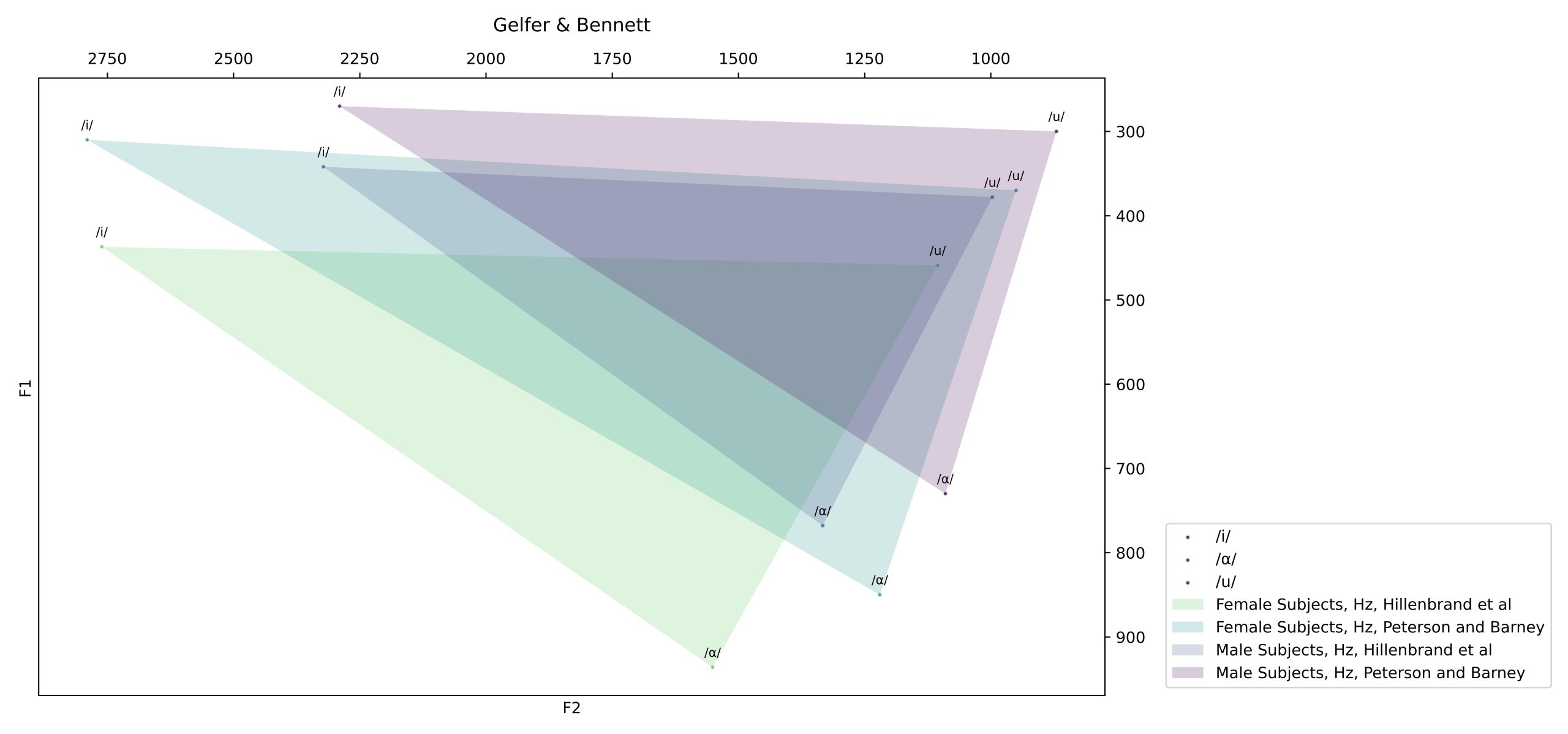
VowSpace uses Matplotlib to visualize vowel formant data. It produces conventional vowel space plots with reversed F2 values on the horizontal axis and reversed F1 values on the vertical axis, although the plotted measurements and axis settings can be modified.
Data from different speakers, languages, or other groups can be represented using separate colors. Users can also add labels, legends, grids, ellipses, and convex hulls to make patterns in the data easier to interpret.
VowSpace can group observations by speaker or by vowel. Grouping by speaker is useful for comparing individual vowel spaces, while grouping by vowel can help visualize the distribution of individual phonemes across speakers or datasets.
Normalization and scale conversion
Normalization options are available through the Normalization Settings interface. VowSpace preserves the original data and applies one selected method at a time to prevent cumulative transformations.
Normalization methods
The normalization methods provided by VowSpace is as follows:
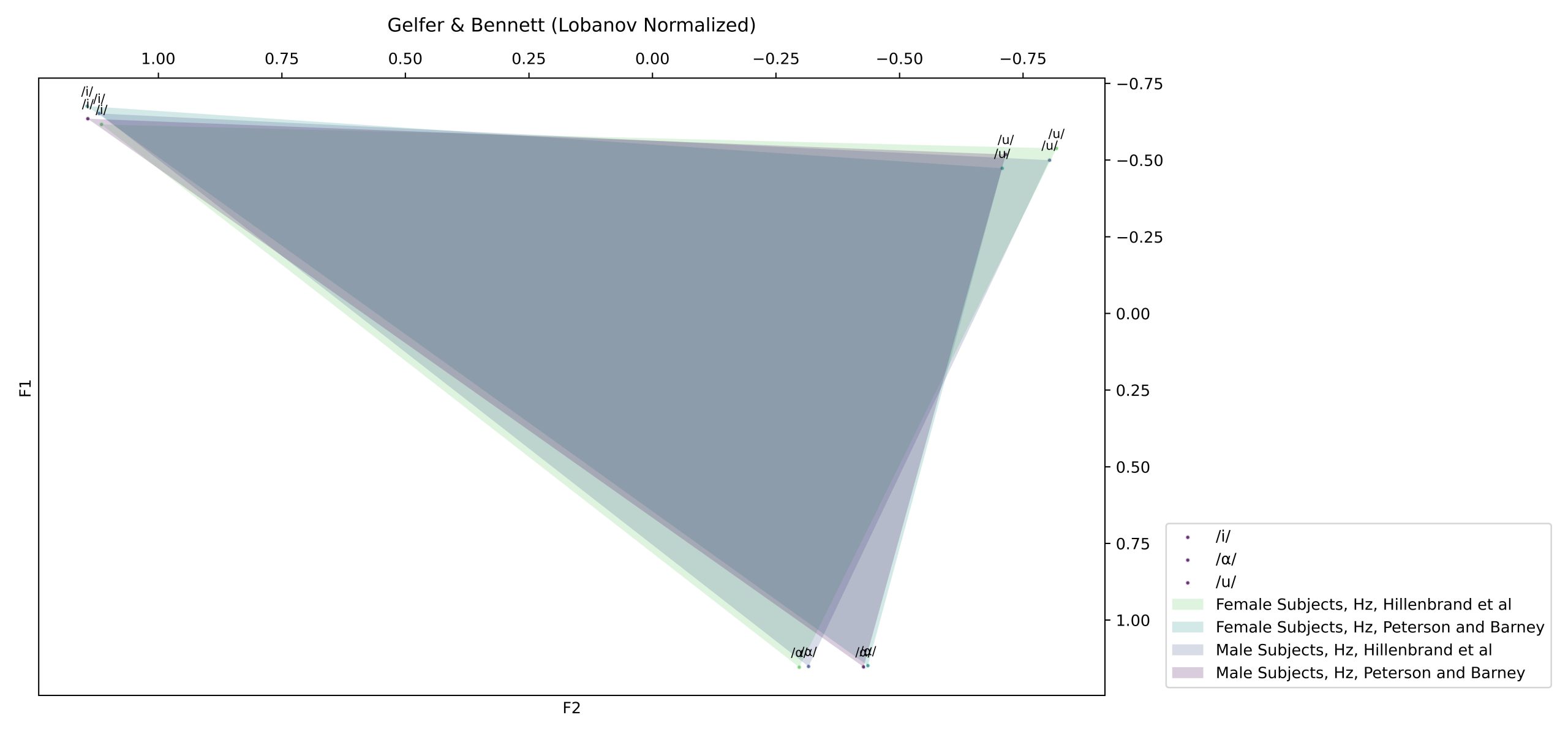
Lobanov normalization
Lobanov normalization reduces speaker-dependent anatomical variation by z-scoring each formant:
F_n[V] = \frac{F_n[V] – \operatorname{mean}(F_n)}{\operatorname{sd}(F_n)}F_n[V] = (F_n[V] - MEAN_n) / S_nBark Difference Metric
The Bark Difference Metric transforms formant values to the Bark scale and calculates perceptual distances such as Z3–Z1 and Z2–Z1:
Z_i = \frac{26.81}{1+\frac{1960}{F_i}} – 0.53 Z_3 – Z_1 Z_2 – Z_1Z_i = 26.81 / (1 + (1960 / F_i)) - 0.53Nearey1
Nearey1 subtracts the logarithm of a speaker-specific formant mean from each log-transformed value:
F_n[V] = \log\left(F_n[V]\right) – \log\left(\operatorname{mean}(F_n)\right)F_n[V] = log(F_n[V]) - log(mean(F_n_all_vowels))Nearey2
Nearey2 uses a shared log mean across formants:
F_n[V] = \log\left(F_n[V]\right) – \operatorname{mean}\left(\log(F_1),\log(F_2),\ldots,\log(F_n)\right)F_n[V] = log(F_n[V]) - mean(log(F_1, F_2, ..., F_n))Frequency-scale transformations
Transformation methods
VowSpace also supports the following transformations:
Log
F_{\mathrm{log}} = \log_{10}(F)F_log = log10(F)Mel
F_{\mathrm{mel}} = 2595\log_{10}\left(1+\frac{F}{700}\right)F_mel = 2595 × log10(1 + F / 700)Bark
Z = \frac{26.81}{1+\frac{1960}{F}} – 0.53Z = 26.81 / (1 + 1960 / F) - 0.53ERB
F_{\mathrm{ERB}} = 21.4\log_{10}\left(1+0.00437F\right)F_erb = 21.4 × log10(1 + 0.00437 × F)The implementations draw on established methods in vowel normalization and on open resources such as Remirez (2022) and the phonR package.
The original data are preserved so that users can change methods without repeatedly transforming already normalized values.
The implementations draw on established work in vowel normalization and resources such as NORM and the LingMethodsHub. More methodological information is available in the VowSpace software paper.

Audio Analysis Tools
Audio Analysis Tools is a separate window accessible from the main VowSpace interface. It uses Parselmouth, a Python interface to Praat, to display and measure:
- Intensity
- Pitch
- Vowel formant frequencies from F1 to F5
Users can inspect an audio recording and add measured formant values directly to the main visualizer by right-clicking the plot in the Audio Analysis Tools window.
Higher formants can be unstable in some recordings. Depending on recording quality and environment, F5 may be returned as NaN. Measurements can be reviewed and edited in the DataFrame Editor or repeated when necessary.
Supported audio formats include WAV, FLAC, AIFF, AIFC, MP3, and OGG.
(I used the Parselmouth library for coding this class. It is an incredible Python interface to Praat! I would like to personally thank Yannick Jadoul for answering my questions on the library’s forum. His help was invaluable in resolving a few bugs along the way. :))

Intensity

Pitch

Vowel formant frequencies
In the most current stage of development, the user is able to add the formant frequencies on any given t to the VowSpace interface by right clicking on the plot on the audio analysis window.
Data format
The minimum dataset must contain the following columns:
| vowel | f1 | f2 | speaker |
|---|---|---|---|
| /æ/ | 123 | 1234 | Özlem |
The required columns are:
vowelf1f2speaker
Additional measurements and derived columns, such as f0, f3, f4, f5, bark_f1, log_f1, and zsc_f1, are also supported where needed.
VowSpace can read and write CSV and Excel files.
DataFrame Editor
The DataFrame Editor allows users to make small adjustments to the current dataset without opening another application. Saving changes automatically updates the plot. Edited data can also be exported as a separate spreadsheet using Save Data As….

Export Plot
The Export Plot dialog allows users to save figures in PNG, JPG, TIFF, SVG, or PDF format. Its live preview shows how changes to DPI, pixel dimensions, and layout settings affect the final output.

IPA keyboard
As phoneticians, we love the International Phonetic Alphabet! VowSpace includes a dedicated IPA keyboard for entering vowel symbols directly within the application.

Tutorials and examples
The VowSpace repository includes step-by-step tutorials on:
- Plotting Turkish vowels
- Extracting formants from a recording and comparing speakers
- Applying Lobanov normalization
The tutorials include example datasets, audio recordings, screenshots, and explanations of the main visualization tools.
Feedback and support
Feedback, bug reports, feature requests, and descriptions of research workflows directly help improve VowSpace.
If you have used the application, I would greatly appreciate it if you completed the anonymous feedback form.
You can also:
- Open an issue on GitHub
- Read the contribution guidelines
- View the changelog
VowSpace is independently developed and maintained. Although I continue to test and improve the application, users should verify its outputs before relying on them in research or publications.
Citation
If you use VowSpace in your research, please cite:
Kaya, A. Ç. (2026). VowSpace: A vowel formant analysis application for phonetic research. Journal of Open Source Software, 11(120), 10189. https://doi.org/10.21105/joss.10189
BibTeX:
bibtex
@article{kaya2026vowspace,
  author  = {Kaya, Ali Çağan},
  title   = {VowSpace: A vowel formant analysis application for phonetic research},
  journal = {Journal of Open Source Software},
  year    = {2026},
  volume  = {11},
  number  = {120},
  pages   = {10189},
  doi     = {10.21105/joss.10189}
}
License
VowSpace is distributed under the open-source GNU General Public License v3.0.
The application is provided as is, without warranty of any kind, express or implied.